
Google reviews carousel and feed layouts: when to use each

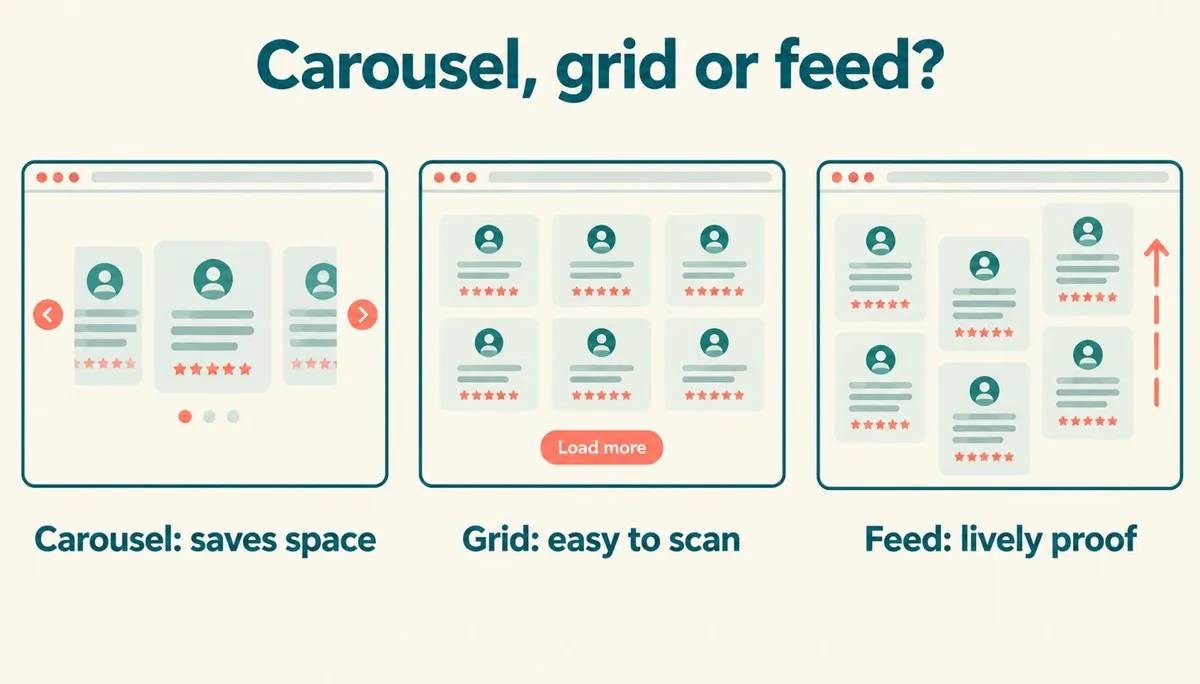
A Google reviews carousel saves space; a grid is easiest to scan; a feed adds gentle movement. Use a carousel on home and service pages, a grid or list near pricing and booking forms, and a feed where you want lively social proof. Whichever you choose, keep controls visible, pause on hover and respect reduced motion.
Why layout matters for a Google reviews widget
The same Google reviews carousel can feel helpful on a home page and annoying beside a booking form. Layout decides how many reviews people see, how much they need to click and how much room the reviews take up. Choosing a layout for each page has more effect than any colour setting.
Carousel, grid, list and feed compared
| Layout | How it looks | Best page | Plan |
|---|---|---|---|
| Carousel | A slider of cards with arrows and swipe | Home and service pages | Paid |
| Modern testimonials slider | One large quote at a time | Landing page hero areas | Paid |
| Grid | Cards in responsive columns | Service and pricing pages | Free |
| List | Wide testimonials stacked vertically | Beside booking or contact forms | Free |
| Masonry / Wall of Love | Staggered cards of different lengths | A dedicated reviews page | Paid |
| Social Media Recommendations | Columns that slowly scroll upwards | Home page social proof | Paid |
| Scrolling marquee / Reviews ticker | Continuous rows or a slim strip | Between page sections | Paid |
When to use a carousel or slider
A carousel (also called a Google review slider) shows several reviews in the space of one row. It suits pages where reviews support the message rather than lead it. Keep arrows visible and turn automatic movement off if most visitors arrive on mobile and like to swipe.
When to use a grid or list
Grids and lists show reviews without any clicking, so they work where people are deciding. A list is narrow enough to sit beside a form. Both are on the Free plan, which makes them a good first customer review widget for your website.
When to use a feed
A Google reviews feed feels like a social stream. The Social Media Recommendations layout moves its columns upward, pauses for pointer and keyboard focus, and becomes still for reduced motion. Use it once per page, as a highlight.
How layouts behave on mobile and tablet
Most review views happen on phones. Under Columns you can set desktop, tablet and mobile separately; tablet uses two by default. A carousel shows one card per view on a small phone, and cards are sized from the space your site actually gives the widget, so cards aren't cut off at the edge.
- Equal card heights: long reviews are trimmed with a Read more link so rows line up.
- Load more: grids and lists can show a Load more reviews button; choose how many appear with Reviews added per Load more.
- No empty cards: star-only reviews with no text are left out automatically, and totals still use your official Google figures.
Skip the reading — build your widget now
Free plan, no credit card. Your reviews are embedded before you finish this guide.
Speed and layout shift
A review widget should never push your page around as it loads. The widget loads after your main content; place it below the first screen or give its container a minimum height to keep Cumulative Layout Shift low. Use one moving layout per page at most; several carousels on one page slow it down and compete for attention.
Mixing Google with other review platforms
Carousels and grids can combine Google with Facebook, Trustpilot, Tripadvisor and more on paid plans, with a tab per platform and each platform's official rating. See multi-platform reviews for the full list.
How to set up a Google reviews carousel
- Create a free account and search your business name to add Google reviews.
- Choose Carousel (or Grid or List on the Free plan) as your layout.
- Open Carousel controls to set arrows, dots and automatic movement.
- Set Columns for desktop, tablet and mobile.
- Match colours, corners and fonts under customisation.
- Copy the one-line code into your site and check it on a phone.
Need the basics first? Read our Google reviews widget guide, see examples of reviews on websites, or compare Google review badges and rating displays.
Sources & further reading
- W3C WAI: Carousels tutorial — Accessible carousel controls and behaviour
- WCAG 2.2: Pause, Stop, Hide (2.2.2) — Moving content must be pausable
- web.dev: Cumulative Layout Shift — Why widgets should reserve space
- Google Maps Platform: Attribution requirements — How Google content must be credited
- Google reviews
- Carousel
- Layouts